
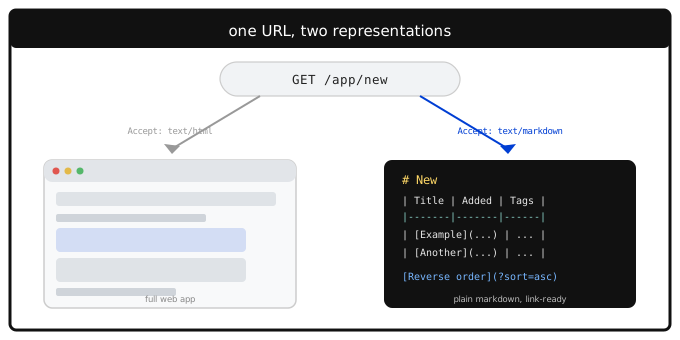
That applies to your public share pages — but we didn't stop there. The same thing now works for your own, private views too.
Public and private, both markdown
Your public share pages work this way now, and so does your own account — the same "New," "Recent," "Popular," "Favorites," "Top Rated," and "Reminders" lists you see at the top of the app, plus any folder, any tag, your RSS feeds, and your dashboard.
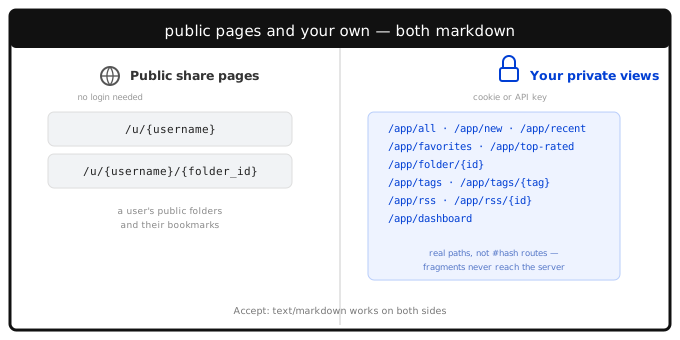
These are real URLs, not the #new / #folder:0 style hash links the app itself uses internally. That's deliberate: a browser resolves those hashes with JavaScript and never sends them to the server at all, so a markdown-only client — an LLM agent, a script, a markdown browser — has no way to ask for them. Giving each view its own real path fixes that, and as a side effect, you can now link directly to "my favorites" or "my Dev folder" from anywhere.
To be clear: your private bookmarks stay private. Having a real URL isn't the same as being public — every one of these paths sits behind the exact same authentication as the rest of your account, a session cookie or your API key. Nobody can read /app/new or /app/dashboard without being logged in as you. Only the public share pages you've explicitly marked public — same as always — are reachable without one.
Plain GET requests to any of these paths behave exactly as before — nothing changes unless you actually ask for markdown.
A few dials
Three query parameters let you shape the output without needing anything fancier than a URL:
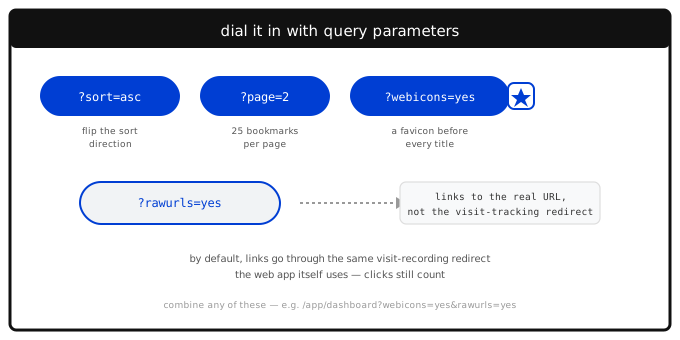
- `?sort=asc` or `?sort=desc` flips a view's default sort direction.
- `?webicons=yes` puts a small favicon in front of every bookmark title, the same Google favicon service the web app itself uses.
- `?rawurls=yes` links straight to a bookmark's real destination instead of LinkaGoGo's visit-recording redirect — handy if you're reading with a client that can't carry your session along when it follows a link.
That last one deserves a word of explanation. By default, a bookmark's title links through the same /visit redirect the web app's own titles use, so opening it from markdown still counts toward "Popular" and "Recently Visited" — your reading habits stay reflected in your own dashboard either way. rawurls=yes is there for the cases where that redirect can't authenticate — mainly an API-key client clicking a link directly rather than fetching it with its own Authorization header.
Try it
`
A public share page — no login needed
curl -H "Accept: text/markdown" \ https://www.linkagogo.com/u/yourusername
Your own "New" view
curl -H "Accept: text/markdown" \ -H "Authorization: Bearer YOUR_API_KEY" \ https://www.linkagogo.com/app/new `
Full details — every URL, both query parameters, and how the dashboard mirrors your own toolbar settings — are in the Markdown Views section of the API docs.
If you'd rather browse than curl
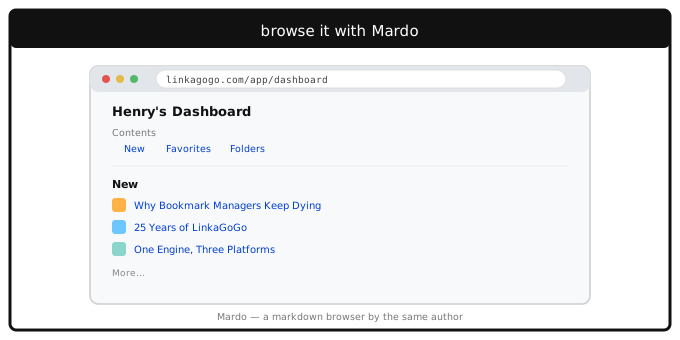
If curl isn't your idea of a good afternoon, there's an actual markdown browser built for pages exactly like these: Mardo, a side project of the same person who builds LinkaGoGo. Its author wrote about building it — "I never thought I would build a browser" — after reading Dave Winer's case for a web of markdown and noticing how much it echoed Gopherspace, the plain-text hierarchy that predates the web, but with markdown's own linking and styling. Point it at any of the URLs above, public or private, and it'll just work.